
How to Get Your Website to Show Up on Google: 5 Expert Tips for Small Businesses
If you’re wondering how to get your website to show up on Google, you’re not alone. Many small business owners struggle when their site doesn’t appear in search results. Just having a website isn’t enough—Google needs to discover, index, and rank it. Common signs of indexing issues include low traffic, slow loading times, or no impressions in Google Search Console. These problems often stem from technical errors or structural missteps in your site setup.
Fortunately, these issues can be resolved, though it requires time and effort. This guide will walk you through how Google works, why your site might be missing from search results, and specific steps to diagnose and fix these issues. From indexing to technical SEO improvements, you’ll learn how to boost your rankings and traffic effectively.
1. Make Sure Google Can Discover and Index Your Website
Before worrying about rankings, traffic, or getting on the “first page of Google,” there’s a more basic question that must be answered first: can Google even find your website?
If your site isn’t indexed, it simply won’t show up—no matter how good it looks or how much money you spent building it. This section lays the foundation for everything that follows, because indexing is step one in Google’s entire process.
What Indexing Actually Means (and How Google Works)
To understand indexing, it helps first to know how Google works in simple terms. Google follows three main steps:
- Crawling—Google discovers pages on the internet
- Indexing—Google stores those pages in its database
- Ranking—Google decides where those pages appear in search results
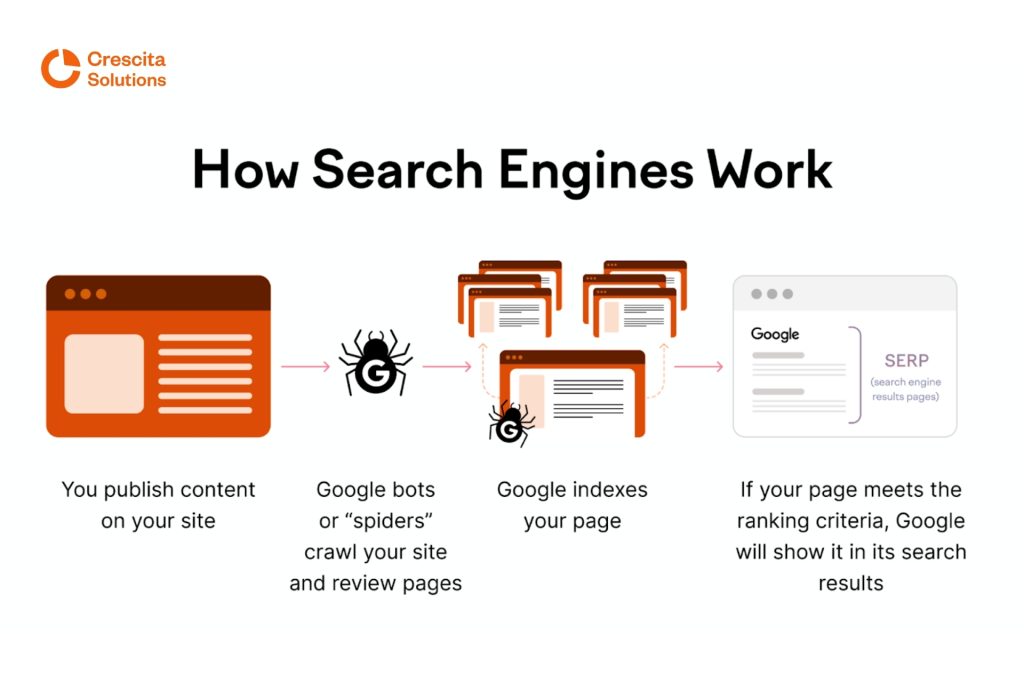
Here’s a simple analogy to make this more straightforward.
Think of Google as a massive digital library:
- Crawling is Google’s librarians going out to collect new books
- Indexing is placing those books on the shelves and cataloguing them
- Ranking is deciding which books should appear first when someone asks a question
If your website hasn’t been collected or catalogued, it doesn’t matter how good the content is—it won’t appear in search results. This is why many small business owners ask:
“Why is my website not showing up on Google?”
Very often, the answer is simple: Google hasn’t indexed it yet or can’t access it properly.
Common Reasons Websites Are Not Indexed
If Google isn’t indexing your website, it’s usually for one (or more) of the reasons below:
- Your site is brand new, and Google hasn’t discovered it yet
- No sitemap has been submitted, so Google doesn’t know what pages exist.
- Pages are blocked by robots.txt or noindex tags.
- Poor site structure makes crawling difficult.
- A very slow site speed causes crawlers to give up.
- Duplicate or thin content that Google chooses to ignore
- No internal or external links pointing to your site
This is why SEO is not just about keywords—it starts with technical accessibility.
Set Up Google Search Console
If you want your website to show up on Google, Google Search Console is the first tool you must set up. It’s Google’s official platform for website owners and gives you direct insight into how Google sees your site.
Here’s what you need to do:
- Verify ownership of your website
- Submit your XML sitemap.
- Check indexing status and errors.
- Monitor impressions and clicks.
Google itself recommends this process in its official search documentation.
Search Console helps you answer critical questions like:
- Is my site indexed?
- Which pages are indexed?
- Are there crawl errors?
- Is Google seeing my content correctly?
Without this tool, you’re essentially guessing.
Submitting Your Website to Google & Bing
Contrary to popular belief, Google doesn’t automatically index every website instantly. You still need to introduce your site correctly.
Submit to Google
- Create and submit an XML sitemap via Google Search Console.
- Request indexing manually for Core pages
Submit to Bing
- Use Bing Webmaster Tools
- Submit your sitemap and verify ownership.
- Bing indexing often complements Google visibility.
This step is simple, yet it’s one of the most commonly skipped steps by small business owners.
How Long Does Indexing Usually Take?
This is one of the most common follow-up questions.
Here’s the realistic answer:
- New websites: a few days to several weeks
- New pages on existing sites: hours to a few days
- Poorly structured or slow sites: weeks or much longer
Indexing speed depends heavily on these factors:
- Website health
- Crawlability
- Content quality
- Internal linking
- Technical setup
This is where patience comes in. SEO is a marathon, not a sprint.
Why This Step Matters Before Anything Else
If your website isn’t indexed:
- It won’t rank for search queries.
- It won’t get impressions.
- It won’t drive traffic.
- It won’t generate your intended leads or sales.
Everything else—keywords, content, backlinks—comes after this step.
In the next section, we’ll look at technical issues that block websites from ranking, including site speed, mobile usability, and structural problems that silently hold many small business websites back.
2. Fix Technical Issues That Block Your Website From Ranking
If your website is indexed but still not appearing on Google search results—or stuck far beyond page one—technical issues are often the silent culprit. Many small business websites look great on the surface but have underlying problems that make it hard for Google to crawl, understand, and trust them. This section focuses on the most common technical blockers and why fixing them is essential before expecting real rankings or traffic.
Slow Website Speed & Poor Hosting
Website speed is no longer optional—it’s a confirmed Google ranking factor and a user-experience dealbreaker. In fact, studies consistently show that over 50% of users leave a website if it takes more than 3 seconds to load, which directly impacts bounce rate, conversions, and rankings.
Common causes of slow websites include:
- Cheap or overcrowded hosting
- Unoptimized images and media files
- Excessive plugins (especially on WordPress)
- Poorly written themes or page builders
- No caching or compression
Google Page Speed Insights helps you measure this directly
If your site fails basic speed benchmarks, Google may crawl fewer pages or rank your site lower—no matter how good your content is.
Mobile Responsiveness Issues (Google Is Mobile-First)
Google now uses mobile-first indexing, which means it primarily evaluates the mobile version of your website when ranking it. If your site looks broken, cluttered, or challenging to use on a phone, that’s a serious problem.
Common mobile issues include:
- Text too small to read
- Buttons too close together
- Horizontal scrolling
- Images breaking layouts
- Forms that don’t work properly
Many small businesses assume desktop optimization is enough—but today, most searches happen on mobile devices. A poor mobile experience can quietly prevent your website from ranking.
Broken Pages, Crawl Errors & Bad Redirects
Another reason your website may not appear correctly on Google is technical errors that confuse search engines.
These include:
- 404 error pages (broken links)
- Redirect chains and loops
- Pages blocked accidentally
- Duplicate versions of the same page
- Incorrect canonical tags
These issues disrupt Google’s crawling process and reduce how much trust Google places in your site. Google Search Console highlights these problems clearly, but they often go unnoticed without regular monitoring.
Why a Website Audit Matters (This Is Where Most Fixes Begin)
A website audit is like a full health check for your site. It reveals:
- Indexing problems
- Speed and performance issues
- Mobile usability errors
- Crawl and structure problems
- Content and keyword gaps
Professional audits often combine tools like:
Without an audit, fixing SEO issues becomes guesswork. With an audit, you get a clear roadmap of what’s broken, what’s holding you back, and what to fix first.
When to Consult SEO Professionals
While some technical issues can be fixed with basic plugins or hosting upgrades, many problems require experience and precision. Misconfigured fixes can sometimes make things worse.
This is where working with experienced SEO teams like Crescita Solutions becomes valuable. Instead of trial-and-error, professionals identify the exact technical bottlenecks, prioritize fixes, and implement them correctly—saving time, money, and missed revenue.Learn more about Crescita’s SEO & content marketing services
Why Technical SEO Comes Before Rankings
If your website is slow, broken, or hard for Google to crawl:
- Content won’t rank properly
- Keywords won’t perform
- Authority signals won’t compound
Technical SEO is the foundation. Once it’s solid, everything else works better.In the next section, we’ll move into optimizing your website for search engines the right way, focusing on keywords, search intent, and content structure—so Google not only finds your site, but understands why it deserves to rank.
3. Optimize Your Website Content for Search Engines
Once Google can find your website and technical issues are under control, the next big question becomes: Does Google understand what your website is about and who it’s for?
This is where SEO fundamentals come in. Many small business websites fail here—not because they don’t try, but because they focus on the wrong things. Proper optimization is less about tricks and more about clarity, relevance, structure, and consistency.
Keywords vs Real Search Intent
Keywords are important, but search intent is Superior.
A keyword tells you what people type.
Search intent exposes why they’re searching.
For example:
- “SEO services” → commercial intent
- “Why is my website not showing on Google?” → informational intent
- “Best SEO agency for small businesses” → high-buying intent
If your page doesn’t match the intent behind the keyword, Google won’t rank it—no matter how many times the keyword appears on the page or in your content.
Good SEO starts by asking:
- What problem is the searcher trying to solve?
- Are they researching, comparing alternatives, or ready to purchase?
- Does my page clearly answer that need?
When intent is aligned, rankings come naturally.
Optimizing Pages Properly (Titles, Headings, Meta Descriptions & Content)
Every core page on your website should be optimized intentionally—not randomly.
At a minimum, each page should have:
- One clear primary topic
- A descriptive page title (what shows on Google)
- A logical & heirarchcal heading structure (H1 → H2 → H3)
- Content that explains the topic clearly and completely
Think of each page as answering one central question extremely well.Google’s own guidelines emphasize helpful, well-structured content over manipulation
Why Keyword Stuffing Doesn’t Work (and Can Hurt You)
Repeating the same keyword over and over may have worked years ago, but today it does the opposite and often harms your SEO.
Keyword stuffing:
- Makes content difficult and unpleasant to read
- Signals low-quality content to search engines
- Can reduce rankings instead of improving them
- Damages reader trust and brand credibility
Google is smart enough to understand context, synonyms, and meaning, so it prefers natural language over forced repetition.
A simple rule to remember:
“If it sounds awkward when read out loud, it’s probably bad SEO.”
Repeating the same keyword over and over may have worked years ago, but today it does the opposite and often harms your SEO.
Keyword stuffing:
- Makes content difficult and unpleasant to read
- Signals low-quality content to search engines
- Can reduce rankings instead of improving them
- Damages reader trust and brand credibility
Google is smart enough to understand context, synonyms, and meaning, so it prefers natural language over forced repetition.
A simple rule to remember:
“If it sounds awkward when read out loud, it’s probably bad SEO.”
Content Clarity, Structure & Readability Matter
Google doesn’t just rank content—it also evaluates how users interact with it.
Clear, well-structured content:
- Keeps visitors on the page longer
- Reduces bounce rate
- Improves engagement signals
- Increases the chances of ranking higher
Simple improvements that make a big difference:
- Short paragraphs
- Bullet points and numbered lists
- Clear and descriptive subheadings
- Simple language instead of heavy jargon & terminologies.
This isn’t just for Google—it’s for real people reading your website.
Bonus: SEO Optimization Also Helps You Get Found by AI & Answer Engines
Well-optimized websites don’t just perform better on Google—they’re also more likely to be cited by modern AI and answer engines such as OpenAI’s ChatGPT, Anthropic Claude, and Google Gemini.
These systems rely heavily on:
- Clear content structure
- Authoritative explanations
- Trustworthy, well-organized pages
In other words, good on-page SEO now fuels both search engines and AI-driven discovery.
Why This Step Unlocks Everything Else
When your website is properly optimized:
- Google understands precisely what you do
- The right pages rank for the right searches.
- Traffic quality improves
- Authority compounds over time
But SEO doesn’t stop at on-page optimization.In the next section, we’ll look at local listings and business profiles, and how they help your website show up faster—especially for location-based searches and small businesses competing locally.
4. Set Up Local & Business Listings to Get Discovered Quicker
Once your website is indexed, technically sound, and properly optimized, local and business listings become one of the fastest ways to gain real visibility—especially for small businesses. These listings help search engines trust your business, understand where & when you operate, and confidently show your website to people searching nearby. Think of them as official “verification points” that support everything you’ve already done.
What a Google Business Profile Is (and Why It Matters)
A Google Business Profile is Google’s official listing for businesses, and it’s often the first thing people see when searching for a company, service, or brand name. It powers local search results, Google Maps, and the “local pack” that appears above regular search listings.
A properly set up profile includes:
Business name, address, and phone number
Website url
Business category and services
Photos and updates
Customer reviews
When optimized correctly, it helps your business show up for searches like “SEO agency near me” or “web designer in Atlanta”—even before traditional websites appear.
Why Local Listings Boost Visibility So Quickly
Local listings send strong trust and relevance signals to search engines. They confirm that:
- Your business is real
- Your location is verified.
- Your services match search queries.
- People interact with and review your brand.
For many small businesses, this is why listings can generate impressions, clicks, and calls faster than SEO alone, especially in competitive local markets.
Bing Places and Other Search Engines Still Matter
While Google dominates search, it’s not the only engine that matters. Bing Places helps your business appear on Bing search results and Microsoft-powered platforms.
Why this is important:
- Bing users still represent millions of searches
- Some demographics prefer Bing by default.
- Bing listings often sync with other directories.
Setting up Bing Places follows a similar process to Google Business Profile and reinforces your overall search visibility.
Consistency of Business Information (NAP Is Critical)
NAP stands for Name, Address, and Phone number, and consistency here is crucial.
Your business details should match exactly across:
- Google Business Profile
- Bing Places
- Your website
- Business directories
- Social profiles
Even slight differences—like “St.” vs “Street”—can confuse search engines and weaken trust signals. Consistency helps Google confidently connect your website, listings, and brand as one entity.
How Business Listings Support SEO Rankings
Local and business listings don’t replace SEO—they strengthen it.
They help by:
- Improving crawl confidence
- Supporting local keyword rankings and click-throughs
- Driving referral traffic
- Increasing brand mentions
- Reinforcing authority and legitimacy
When combined with solid technical SEO and optimized content, listings accelerate visibility and help your website move up search results faster.
In the next section, we’ll look at how content and authority signals push your website even further up Google, turning visibility into sustained traffic and long-term growth.
5. Use Content & Authority Signals to Move Up Google Search
At this stage, your website is indexed, technically sound, optimized, and supported by business listings. What separates websites that merely exist on Google from those that move up Google search results is content and authority. This is where long-term SEO growth truly happens and where successful websites begin to pull ahead of competitors in a sustainable way.
Why Content Is Essential to Ranking
Google ranks pages, not brands—and content is what lives on those pages.
Without content:
- Google has nothing new to crawl
- There are fewer opportunities to rank
- Search intent goes unanswered
- Authority cannot be built
Content helps Google clearly understand:
- What your business does
- Which problems you solve
- Which searches you should appear for
This is why websites with only a few static pages often struggle to rank, even if they are technically perfect.
Blogging for Indexing, Visibility & Traffic Growth
Blogging is one of the most effective ways to grow search visibility over time.
A strong blogging strategy helps you:
- Get more pages indexed
- Target long-tail search queries
- Answer real customer questions
- Build topical authority in your niche
Every high-quality blog post becomes another entry point into your website. Over time, these posts compound—older content can continue driving traffic months or even years later when optimized properly. This is also why content marketing and SEO work best when they are tightly aligned. Professionals often use tools like Semrush and Ahrefs to identify content gaps, keyword opportunities, and ranking potential—but tools alone are only effective when paired with the right strategy.
Backlinks & Authority Signals (Why They Help You Move Up Google)
Once your website has solid content and proper optimization, authority signals are what help push it higher in search results. One of the strongest of these signals is backlinks—links from other reputable websites pointing to yours. In simple terms, backlinks act like recommendations, telling Google that your site is trusted and worth showing to more people. When combined with helpful content, they play a significant role in how to make your website show up on Google search, especially for competitive queries.
Instead of chasing random or spammy links, the focus should be on earning mentions naturally through quality content, partnerships, and visibility across trusted platforms. This is what helps Google assess your site’s trustworthiness, authority, and credibility over time—and why shortcuts rarely work anymore.
Why Expert SEO Execution Makes the Difference
At this point, many small businesses understand what needs to be done, but execution is where most struggle. Content planning, link building, technical upkeep, and performance tracking require experience, tools, and a clear system. Working with professionals like Crescita Solutions removes the guesswork and helps implement proven strategies that compound traffic, authority, and revenue over time.
Bringing It All Together
Making your website show up on Google isn’t about one-off tricks—it’s the result of content, authority, technical health, and consistency working together. With the right strategy and support, small businesses can turn visibility challenges into sustainable growth opportunities and long-term search success.
Conclusion
Most websites don’t show up on Google, not because they’re “bad”, but because something essential is missing—proper indexing, strong technical SEO, clear optimization, consistent content, or the trust signals Google relies on to rank pages. Search Engine Optimization is a long-term process, not an instant fix, and meaningful results come from patience, the right strategy, and steady execution.
A smart first step for any small business is to conduct a website audit using trusted tools like PageSpeed Insights, Semrush, or Ahrefs to identify what’s holding the site back, then work with dedicated specialists to turn those insights into real improvements that drive traffic and revenue—because Google visibility problems are common, solvable, and absolutely fixable with the proper guidance.
FAQs
1. Why is my website not showing up on Google search?
Your website may not be indexed yet, may have technical issues, or the contents may not be properly optimized for search engines.
2. How long does it take for a website to appear on Google?
Most websites start appearing within a few days to a few weeks, depending on indexing, site quality, and competition.
3. Do I need to submit my website to Google manually?
Yes, submitting your site through Google Search Console helps Google discover and index it faster.
4. Can SEO fix a website that isn’t ranking at all?
Yes, SEO can identify and fix technical, content, and authority issues that prevent a website from ranking.
5. Should I hire an SEO agency or try fixing this myself?
Basic fixes can be done yourself, but an experienced SEO agency saves time and delivers better long-term results.