The Average Cost of Website Design for U.S. Small Businesses in 2026 (A Comprehensive Breakdown)
The average cost of website design depends on various factors, which is why many small business owners feel confused when trying to budget for one. Prices can range from a few hundred dollars to tens of thousands, but there’s no single “right” number because cost is tied to what the website is meant to do. In 2026, a website is no longer just a digital brochure—it’s a core business asset that directly affects credibility, trust, and revenue. With most customers researching businesses online and judging credibility based on website quality, your site often makes the first impression long before you ever speak to a prospect.
That’s also why modern websites must do more than simply look good. They need to be fast, mobile-friendly, secure, accessible, SEO-ready, and designed to convert visitors into leads or customers, while also being structured clearly enough for search engines and AI-driven discovery tools to understand. All of this influences cost, because the purpose, complexity, and growth goals of your business shape how your website should be built. In the sections that follow, we’ll break down what small business websites really cost in the U.S. in 2026, what those price ranges include, and how to invest wisely without paying for things you don’t need.
What is the average cost of website design for U.S. small businesses in 2026?
When people ask about the average cost of website design, what they’re really asking for is a single number—but in reality, website pricing works in ranges, not fixed prices. That’s because the cost of a website depends on what it’s meant to do, how complex it is, the experience level of the developer in charge, and how much growth you expect from it. In 2026, small business website pricing is best understood by looking at tiers, each offering different levels of functionality, flexibility, and return on investment.
Typical Website Design Pricing Tiers in 2026
Below are the most common pricing ranges small businesses in the U.S. fall into:
- DIY Website Builders ($100–$500 per year)
- Template-based builders with limited customization
- Minimal upfront cost, but fairly heavy time investment
- Best for very early-stage businesses or placeholders
2. Freelance Web Designers ($1,000–$5,000)
- Custom design with limited strategy
- Suitable for simple service or portfolio websites
- Quality depends heavily on the freelancer’s experience
3. Small-sized Web Design Agencies ($3,000–$10,000)
- Conversion-focused design and better UX
- Search Engine-ready structure and mobile optimization
- Ideal for most established small businesses
4. Advanced/Enterprise-Grade Builds ($10,000–$20,000)
- Custom functionality, integrations, and scalability
- Deep UX, performance optimization, and advanced SEO
- Typically used by fast-growing or multi-location businesses
What Small Businesses Think They Need vs What They Actually Need
Many small business owners assume they need:
- Dozens of pages
- Complex animations
- Custom features they may never use
In reality, most small businesses need:
- A clean, fast, mobile-friendly website
- Clear messaging and strong calls-to-action
- SEO-ready pages that attract and convert traffic
- A structure that supports growth, not just launch
Paying for unnecessary complexity can inflate costs without improving results.
Cost vs Value: Cheap Websites vs Revenue-Generating Websites
A low-cost website may look fine on the surface but often lacks:
- Conversion-focused UX
- Proper SEO setup
- Speed and performance optimization
- Scalability for future growth
On the other hand, a well-built website is designed to:
- Build trust instantly
- Capture leads and inquiries
- Support SEO and organic traffic
- Generate measurable ROI over time
This is why the “cheapest option” often becomes the most expensive in the long run.

Website Design Cost Comparison (Quick Overview)
| Cost Range | Typical Features | Expected Outcome |
|---|---|---|
| $100–$500/year | Templates, basic pages, DIY setup | Online presence only |
| $1,000–$5,000 | Custom design, basic UX | Credibility + limited leads |
| $3,000–$10,000 | SEO-ready, conversion-focused | Consistent leads & growth |
| $10,000–$20,000 | Advanced UX, scalability | Strong ROI & long-term value |
Understanding these ranges makes it easier to budget realistically and avoid overpaying—or underinvesting. In the next section, we’ll break down the different types of websites small businesses build and explain how complexity directly influences pricing.
Types of Websites & Their Cost Complexity Levels
One of the biggest reasons website prices vary so widely is complexity. Not all websites are built for the same purpose, and the more functionality, content, and scalability a site requires, the more time, expertise, and cost go into building it. Understanding the type of website you need helps you budget realistically and avoid paying for features that don’t align with your business goals.
Common Website Types and Typical Cost Ranges
| Website Type | Complexity Level | Typical Cost Range (USD) | Best For |
|---|---|---|---|
| Personal website | Very low | $300 – $1,000 | Individuals, personal branding |
| Portfolio website | Low | $800 – $2,500 | Creatives, freelancers |
| Small business / service website | Medium | $2,500 – $7,500 | Local & service-based businesses |
| Blog / content-driven website | Medium | $2,000 – $6,000 | Thought leadership, SEO growth |
| E-commerce website | High | $5,000 – $15,000 | Online stores |
| Non-profit / charity website | Medium | $2,000 – $6,000 | Donations, awareness |
| Subscription-based website | High | $7,000 – $20,000 | Memberships, SaaS, gated content |
| Multi-location or custom website | Very high | $10,000 – $20,000+ | Franchises, scaling businesses |
What Each Website Type Typically Involves
Personal websites (lowest complexity)
Simple pages, minimal features, and basic design, often built with templates or no-code tools.
Portfolio websites
Visual-focused layouts, galleries, light interactivity, and moderate design effort.
Small business/service websites
Multiple service pages, contact forms, search engine optimized structure, and conversion-focused layouts.
Blog & content-driven websites
Content architecture, category structures, internal linking, and SEO readiness for growth.
E-commerce websites
Product catalogs, payment gateways, inventory management, security, performance tuning.
Non-profit / charity websites
Donation systems, storytelling content, trust and transparency features.
Subscription-based websites
User accounts, gated content, payment subscriptions, backend logic.
Multi-location or custom-functionality websites
Advanced UX, integrations, scalability, custom development.
How Website Complexity Affects Cost
Website complexity directly influences several key cost drivers:
- Design time
More pages, layouts, and user flows increase design effort. - Development effort
Advanced features require more development hours and testing. - Development stack used
- Simple sites: no-code or low-code tools
- Complex sites: full-stack development (frontend + backend)
- Search visibility setup
Larger or content-heavy sites need deeper SEO structure, schema, and indexing planning. - Ongoing maintenance cost
Complex websites require regular updates, security monitoring, and performance optimization.
Why This Matters for Small Businesses
Choosing the right website type helps you:
- Avoid overbuilding and overspending
- Focus on features that drive leads and sales
- Plan for future growth without rebuilding from scratch
In the next section, we’ll break down what actually goes into website design costs—from hosting and domains to SEO, security, and maintenance—so you can clearly see where your money goes and why.
What Goes Into Website Design Costs?
When small business owners see website quotes that vary wildly, it’s usually because they’re not seeing what’s under the hood. Website design costs aren’t random—they’re made up of several moving parts that work together to create a functional, secure, and conversion-ready website. Let’s break these down clearly so you understand exactly what you’re paying for and why it matters.
Domain & Hosting Costs (Your Website’s Address and Home)
Every website needs two basics: a domain name (your web address) and hosting (where your site lives online).
Domain pricing (per year):
- Standard domains: $10 – $20
- Premium or competitive names: $50 – $500+
Hosting types and cost ranges:
- Shared hosting ($5 – $15/month): affordable, but slower and less reliable
- Managed hosting ($20 – $60/month): faster, more secure, better support
Popular providers small businesses commonly use include:
- Namecheap (budget-friendly domains & hosting)
- GoDaddy (wide range of domain options)
- Hostinger (good balance of performance and cost)
While cheap hosting lowers upfront cost, it can increase long-term expenses through slow load times, downtime, and security issues.
Design, Pages & Features (What Visitors See and Interact With)
This is where costs start to scale based on complexity.
Key factors that affect pricing:
- Number of pages: 5-page sites cost far less than 20–30 page builds
- Custom vs template design:
- Templates are cheaper and faster
- Custom designs cost more but improve branding and conversions
- Responsive & mobile-first design: now non-negotiable in 2026
Additional features that add cost:
- Contact forms and lead capture
- Booking or appointment systems
- Payment gateways
- CRM or email marketing integrations
The more user flows and features involved, the more design and development time required.
Content & Basic SEO Setup (Brand Visibility Starts Here)
A website without proper content and SEO structure struggles to perform, no matter how good it looks.
Content considerations:
- Placeholder content: cheaper but weak for conversions
- Professional copywriting: costs more but builds trust and clarity
Basic SEO setup typically includes:
- Page titles and meta descriptions
- Proper heading structure (H1–H3)
- Clean URLs and internal linking
- Indexing readiness
Tools like Rank Math help manage on-page SEO efficiently on WordPress:
Modern websites also benefit from LLM-friendly structure, meaning clear content hierarchy and authoritative explanations that support AI-powered search, answer engines, and AEO/GEO opportunities.
Security, Performance & Maintenance (Often Overlooked, Always Important)
These costs protect your website and keep it running smoothly long after launch.
Security essentials:
- SSL certificates (often included with hosting)
- Firewalls and DDoS protection (Cloudflare)
Performance & reliability:
- Speed optimization
- Caching and image compression
Maintenance tools & costs:
- Regular updates and backups
- Backup solutions like UpdraftPlus
- Typical maintenance cost: $50 – $300/month, depending on complexity
Skipping maintenance may save money short-term, but it often leads to security breaches, slow performance, or expensive rebuilds later.
Website Cost Breakdown (Quick Overview)
| Cost Component | Typical Range |
|---|---|
| Domain | $10 – $100+/year |
| Hosting | $5 – $60/month |
| Design & build | $1,000 – $15,000+ |
| Content & SEO setup | $300 – $3,000 |
| Maintenance & security | $50 – $300/month |
Understanding these cost components makes it easier to budget realistically and avoid surprises. In the next section, we’ll look at the core essentials every small business website must have in 2026, so you know where to prioritize spending and where you can safely save.
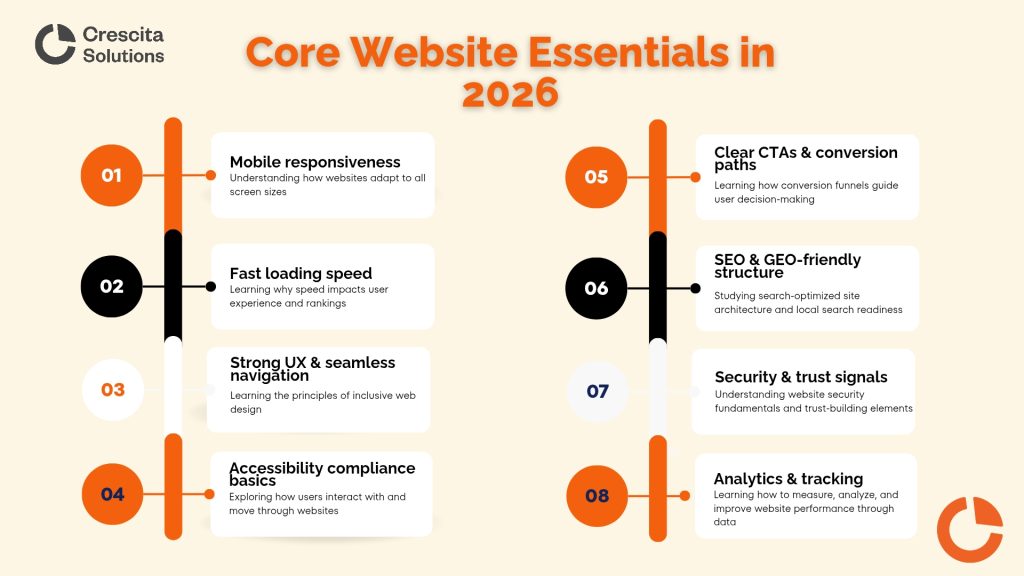
Core Website Essentials Every Small Business Must Have in 2026
In 2026, a small business website isn’t judged by how “nice” it looks, but by how well it works. Think of your website like a physical storefront: if the door is hard to open, the lights are dim, or customers can’t find the checkout, they’ll leave—no matter how good your product is. The essentials below are the foundation of a website that attracts visitors, builds trust, and converts interest into revenue. Skipping any of them may reduce upfront costs, but it almost always increases long-term costs through lost leads, poor rankings, and expensive rebuilds.
1.Mobile Responsiveness
Mobile responsiveness means your website works perfectly on phones and tablets, not just desktops—and in 2026, this is non-negotiable. Over 64% of all web traffic now comes from mobile devices, and 96.3% of internet users access the web using a mobile phone. In simple terms, most people will see your website on a small screen first. If visitors have to zoom in, scroll awkwardly, or struggle to tap buttons, they won’t “figure it out”—they’ll leave.
Browser usage data reinforces this reality. As of December 2025, Chrome alone accounts for over 71% of global browser usage, followed by Safari at nearly 15%, with mobile-heavy browsers like Samsung Internet and Opera also in the mix. This means your website is being accessed across a wide range of mobile devices, screen sizes, and browsers every single day. When web developers or small business owners underestimate mobile responsiveness and usability, they risk losing the majority of their audience before a page even loads—while also hurting search visibility, since Google prioritizes mobile-friendly websites when ranking results.
Sources
Exploding Topics – Mobile Internet Traffic
StatCounter – Browser Market Share Worldwide (Dec 2025)
2. Fast Loading Speed
Website speed is the digital version of customer patience. If your site takes more than a few seconds to load, visitors drop off—often before seeing your message. A fast website keeps people engaged, improves trust, and supports better search rankings. Slow sites cost money quietly by increasing bounce rates and reducing conversions, which is why performance optimization is a must, not a luxury.
3. Strong UX & Seamless Navigation
User experience (UX) is how easy and intuitive your website feels to use. Clear menus, logical page flow, and simple layouts help visitors quickly find what they’re looking for. Think of UX like clear aisle signs in a store—when customers don’t have to ask for directions, they’re more likely to stay and buy. Poor UX confuses users, reduces trust, and directly lowers conversions.
4. Accessibility Compliance Basics
Accessibility ensures your website can be used by people with disabilities, including those using screen readers or keyboard navigation. Beyond being the right thing to do, accessibility improves usability for everyone and reduces legal and reputational risks. Simple steps—like readable text, proper contrast, and clear structure—make your site more inclusive and future-proof.
5. Clear CTAs & Conversion Paths
A call-to-action (CTA) tells visitors what to do next—call, book, buy, or contact you. Without clear CTAs, visitors may like your site but leave unsure of the next step. Imagine a store with no checkout counter; that’s what a website without CTAs feels like. Clear conversion paths turn traffic into measurable business results.
6. Security & Trust Signals
Security builds confidence. SSL certificates, visible contact details, privacy policies, and secure forms reassure visitors that your site is safe. Without these signals, users hesitate to submit information or make purchases. Security issues also risk data loss and downtime, which can be far more expensive than preventative measures.
7. Search Engine & Generative Engine Friendly Structure
An SEO- and GEO-friendly structure helps search engines—and modern AI and answer engines—understand your website clearly. This includes clean page structure, logical headings, and well-organized content. When done right, your site becomes easier to find on Google and more likely to be referenced by AI-driven discovery tools. Poor structure limits visibility and forces you to rely more on paid ads over time.
8. Analytics & Tracking
Analytics show you what’s working and what’s not. Without tracking tools, running a website is like driving with your eyes closed—you’re spending money without knowing the return. Analytics help you measure traffic, conversions, and user behavior, enabling you to make smarter decisions and continuously improve performance. Many “experts” overlook these essentials, focusing only on design aesthetics or quick launches. At Crescita Solutions, these fundamentals are built into every project by default, ensuring that websites are not only visually appealing but alsofast, secure, accessible, SEO-ready, and conversion-focused. To see how this approach is applied in practice, explore our small business web design services.
DIY & AI Website Builders – Costs, Benefits, and Hidden Trade-Offs
The DIY approach and AI website builders have become incredibly popular among small business owners, mainly because they promise speed, simplicity, and low upfront costs. Tools like Wix AI Website Builder, 10Web AI, Lovable, v0, Builder.io, and Bolt.new make it possible to generate a website in hours—or even minutes. While these platforms can be useful in certain situations, it’s important to understand where they shine, where they fall short, and the hidden trade-offs that often don’t show up at first glance.
Popular DIY & AI Website Builders (Quick Overview)
- Wix AI Website Builder – Beginner-friendly, design-focused, limited flexibility
- 10Web AI – WordPress-based AI builder with hosting bundled
- Lovable / v0 / Bolt.new – Developer-assisted AI tools for fast UI generation
- Builder.io – Visual building with headless CMS capabilities
These tools are designed to reduce friction, but they’re not all built for long-term business growth.
Benefits of DIY & AI Website Builders
Low upfront cost
DIY and AI builders are often cheaper at the start, with monthly plans that feel manageable for early-stage businesses or side projects.
Speed
You can launch quickly without waiting weeks for design and development, which is appealing if you just need an online presence fast.
Ease of use
Most platforms require little to no technical knowledge, allowing non-developers to build and manage a site independently.
Limitations You Should Be Aware Of
Generic design
AI-generated layouts often look similar across industries, making it harder for your brand to stand out from competitors.
Weak SEO foundations
While some builders claim to be “SEO-friendly,” many lack deep control over technical SEO, site structure, and long-term optimization.
Scalability issues
As your business grows, adding advanced features, integrations, or custom workflows can become expensive—or impossible—without rebuilding.
Hidden Costs Most People Don’t Factor In
| Hidden Cost | Why It Matters |
|---|---|
| Time | Business owners spend hours learning tools instead of running their business |
| Missed leads | Poor UX, slow speed, or weak SEO reduces conversions |
| Rebuild costs | Many DIY sites need full redesigns later |
| Brand perception | Generic sites can make your business look smaller or less credible |
A website that looks cheap can quietly cost you sales, trust, and long-term growth—especially if competitors are investing in more polished, conversion-focused platforms.
The Opportunity Cost of Doing Everything Yourself
Opportunity cost is what you lose by choosing one option over another. When business owners handle design, content, SEO, and updates themselves, the real cost isn’t just money—it’s lost focus. Every hour spent tweaking layouts or troubleshooting plugins is an hour not spent on sales, customer service, or strategy. Over time, this can slow growth far more than the initial savings are worth.
When DIY or AI Builders Make Sense (and When They Don’t)
DIY and AI builders can work for:
- Early validation or MVPs
- Personal or temporary websites
- Very small operations with minimal competition
They often fall short for:
- Growth-inclined small businesses
- Competitive local markets
- Brands that rely on trust, authority, and conversions
The Big Takeaway
DIY and AI website builders lower the barrier to entry—but they don’t remove the need for strategy, SEO, or conversion thinking. For businesses planning to grow, the hidden costs and opportunity costs often outweigh the initial savings. This is why many small businesses eventually transition from DIY builds to professionally designed websites that are built to scale, convert, and compete effectively.
In the next section, we’ll look closely at hiring a specialist, what professional website design really costs in 2026, and how to choose the right partner without overpaying.
Hiring a Web Design Specialist – What It Costs
When people talk about the average cost of website design, this is usually the moment where everything clicks. In 2026, “hiring a web designer” no longer means paying someone to make a few pages look nice—it means bringing in a specialist (or team) that understands Search Visibility, conversions, performance, and long-term growth. That broader scope is exactly why professional pricing varies, and why the cheapest option is rarely the most cost-effective.
What “Hiring a Web Designer” Really Means in 2026
A modern web design specialist is responsible for far more than visuals. They’re expected to:
- Build a fast, mobile-first, secure website
- Structure pages for Search Engines and AI/LLM discovery
- Design clear conversion funnels & pipelines.
- Ensure scalability as the business grows
- Provide ongoing support and optimization
This expanded responsibility is what separates short-term websites from long-term business assets—and it’s what shapes the true average cost of website design today.
Freelancer vs Agency vs In-House Developer (Cost & Value Comparison)
| Option | Typical Cost (2026) | Pros | Cons |
| Freelancer | $1,000 – $5,000 per project | Affordable, flexible | Limited capacity, SEO often basic, support inconsistent |
| Small Agency | $3,000 – $10,000 per project | Strategy, SEO-ready builds, better UX | Higher upfront cost |
| In-House Developer | $60,000 – $120,000+/year | Full control, long-term availability | Could be expensive for small businesses |
This comparison helps clarify the “average cost” question: most U.S. small businesses land in the agency range, because it balances expertise, scalability, and cost far better than the alternatives.
What to Look for When Hiring a Web Design Specialist
Not all professionals are equal, and many focus too heavily on aesthetics alone. Smart small businesses look for teams that check these boxes:
- Portfolio and reviews
Evidence of results matters more than pretty mockups. - SEO-first thinking
A web designer who thinks in SEO builds structure, speed, and visibility into the site from day one. - Conversion focus and ROI mindset
The goal isn’t beauty—it’s leads, sales, and measurable growth.
Affordable ongoing support
Websites need updates, tweaks, and optimization without punishing monthly fees
Why Crescita Solutions’ Small Business Packages Make Sense
This is where many ambitious small businesses find clarity. Crescita Solutions designs websites specifically for growth—not just launch.
Our small business web design packages focus on:
- Lean builds that avoid unnecessary complexity
- SEO-ready structure from the ground up
- Conversion-first layouts that turn traffic into leads
- Long-term growth support at considerate, scalable rates
Instead of paying twice—once for a cheap site, then again for a rebuild—businesses get it done right the first time.
When Hiring a Professional Is Actually the Cheapest Option
For growth-focused small businesses, hiring a specialist often becomes the most cost-effective decision long term. It reduces rebuild costs, improves conversions, strengthens SEO, and saves the business owner time they can reinvest into sales and strategy. When you factor in opportunity cost, missed leads, and brand perception, professional website design consistently delivers the highest return.
This brings us full circle to the core question of the article. In the conclusion, we’ll tie everything together and show how small businesses can budget smart, avoid costly mistakes, and invest confidently in a website that truly supports their goals in 2026.
In Conclusion, How Much a Website Should Cost (and How to Spend Wisely)
When you look across everything we’ve covered—from website types and complexity to DIY tools, hidden costs, and hiring specialists—it becomes clear that the average cost of website design for small business isn’t about chasing the lowest price, but about aligning spend with purpose. A website in 2026 is an investment, not an expense. When executed properly, it becomes a lead generator, a credibility builder, and a sales asset that works around the clock. Cheap websites may reduce upfront costs, but they often increase long-term expenses through poor performance, rebuilds, and missed opportunities, while smart spending focuses on structure, usability, SEO readiness, and conversions.
The most successful small businesses minimize costs by avoiding overbuilding, prioritizing core essentials, and working with experts who understand both design and growth—not just aesthetics. You don’t need an enterprise budget to win online, but you do need clarity, proper audits, and informed guidance to ensure your website delivers real ROI. With the right strategy and execution, even a modestly priced website can outperform larger competitors and become one of the most valuable assets your business owns.
FAQs
How much should a small business website cost in 2026?
Most small business websites pricing in 2026 ranges between $2,500 and $10,000, depending on complexity, features, and revenue goals.
Is WordPress cheaper than custom websites?
Yes, WordPress is generally more cost-effective because it reduces development time while still supporting SEO, customization, and scalability.
How much does website maintenance cost monthly?
Website maintenance typically costs $50 to $500 per month, depending on security, updates, performance, and support needs.
Can a cheap website still generate leads?
A cheap website can generate leads, but only temporarily—long-term results usually require proper technical optimizations, seamless UX, and conversion-focused design.
Should I hire a freelancer or a web design agency?
Freelancers work for simple needs, but agencies offer better strategy, SEO integration, and long-term ROI for growth-focused businesses.
.